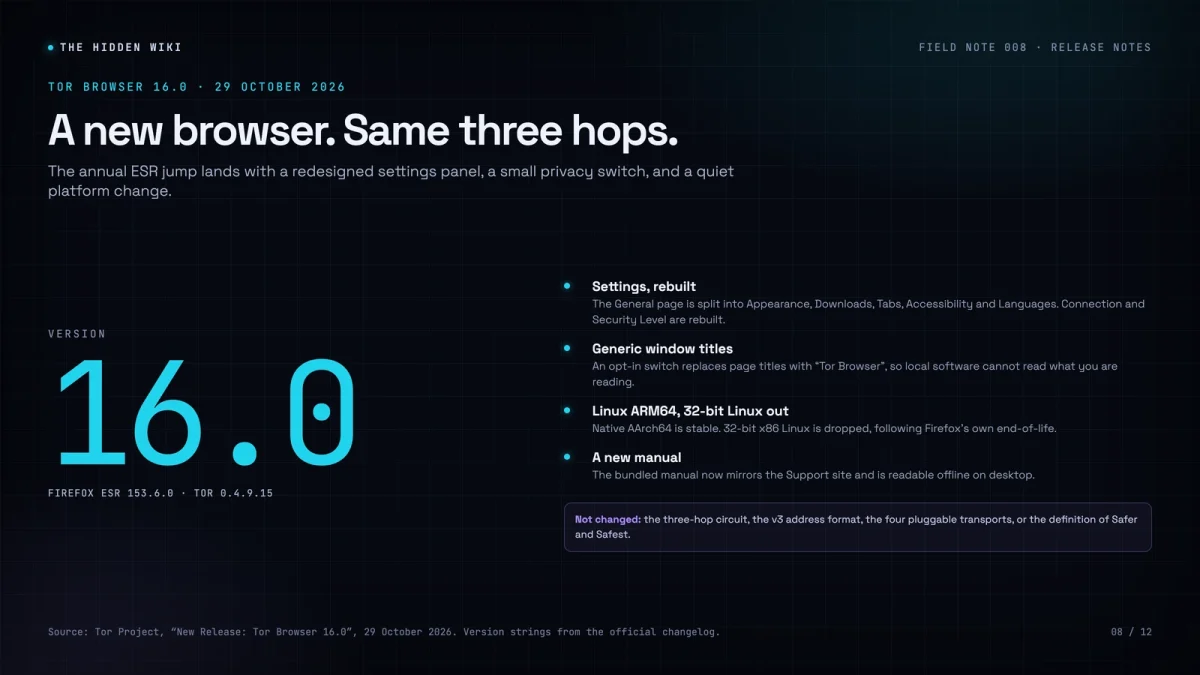
Tor Browser 16.0 arrived on 29 October 2026, and the headline is not a new anonymity feature. It is a browser rebuild: a new Firefox base, a redesigned settings panel, and a small privacy switch that is easy to miss. If you use Tor to read a directory or check a news mirror, the practical advice is the same as always — update, then check that the update did not change a setting you rely on.
What actually shipped
The release is the first stable build based on Firefox ESR 153, specifically 153.6.0esr. It ships Tor 0.4.9.15 and NoScript 13.6.37.1984. The Tor Project says its annual ESR audit covered more than 270 Bugzilla issues, which is the unglamorous work that makes a browser safe to use on a hostile network.
On desktop, the Settings experience has been rebuilt. The old General page is gone, split into Appearance, Downloads, Tabs and browsing, Accessibility and Languages. The Tor-specific Connection and Security Level pages have been rebuilt with Firefox’s new components. Settings that could weaken your privacy are now hidden or carry clearer warnings. If you had customized something, the release notes say your preferences are preserved, but it is worth opening Settings and confirming that the things you care about are still where you think they are.
The new privacy switch is called “generic window titles”. It lives under Privacy and security → Protections from third-party applications. When enabled, every window title becomes “Tor Browser” instead of the title of the page you are reading. That matters because other applications on your computer, and the operating system itself, can often read window titles without special permission. If you are worried about local snooping — someone looking at your screen, a piece of malware with minimal privileges, a desktop environment that logs titles — this closes a small but real leak.
It is opt-in, and the Tor Project is explicit about why: the setting has not been fully evaluated for screen-reader users or people with unusual desktop environments. If you rely on accessibility tools, try it and report what breaks. If you do not, it is a reasonable switch to turn on.
The platform changes are the ones that will bite
Tor Browser 16.0 adds native Linux ARM64 builds. If you run Linux on a Raspberry Pi or an Apple Silicon machine, this is good news: you no longer need the Alpha channel to get a supported build. The release also drops 32-bit x86 Linux, following Firefox’s own end-of-life. The Tor Project says it sees around 200 update checks a day from 32-bit Linux, down from a peak of about 4,000 in 2019. Most of those users can move to a 64-bit build. A few cannot, and they will need to decide what to do before the next security release.
On Android, large parts of the interface have moved to Material Design 3 and Jetpack Compose. The manual still cannot be bundled on Android because of Google Play’s 100 MB APK limit, which is an annoying constraint but not a security one.
The new manual is worth a mention. It now mirrors the content of the Tor Support site, is available at about:manual or through the application menu, and is bundled for offline reading on desktop. If you have ever tried to troubleshoot a connection problem while your only browser cannot reach the network, you will understand why this matters.
What did not change
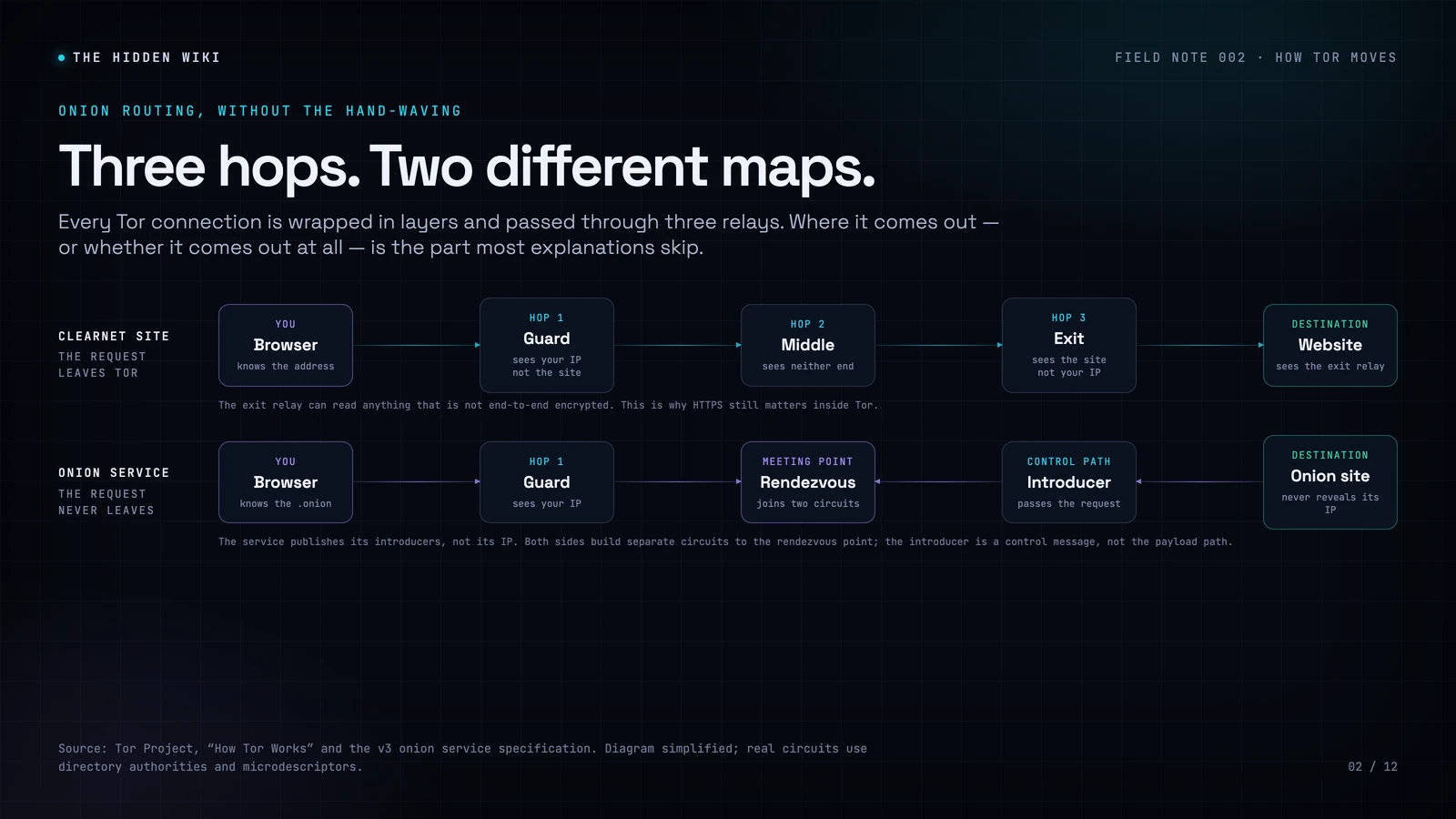
The three-hop circuit is still three hops. The v3 address format is unchanged. The four pluggable transports — obfs4, meek, Snowflake and WebTunnel — are the same set. The definitions of Standard, Safer and Safest are unchanged: Safer still disables JavaScript on non-HTTPS sites, and Safest still disables it everywhere. If you were hoping that 16.0 would make an unstable site work at Safest, it will not.
The release also does not ship the new circuit display that the Tor Project has been showing in alpha. That feature, which visualizes multi-path circuits and will eventually bring a circuit display to Android, is still in the works. Do not let a screenshot of an alpha build convince you that it is part of the stable release.
The security context: a rough October
16.0 lands six days after an emergency Tails release, and twelve days after the certificate block that prompted it. On 17 October 2026, Mozilla blocked intermediate certificates belonging to eMudhra after they were compromised. Tor Browser 15.0.26, released on 21 October, added the block. Tails 7.15.1, released on 23 October, updated both Tor Browser and the system certificate store.
The short version: with a compromised intermediate, an attacker could impersonate any HTTPS website, including to a Tor user, and the attacker could be a Tor exit node, the ISP of an exit node, or a government. Onion sites were not vulnerable because they do not use the public certificate authority system. The longer version is in our separate explainer. The point for this article is simpler: 16.0 includes the fix, and if you are still on an older build, you are carrying a problem that has already been patched.
How to update, and what to check afterward
Tor Browser should offer the update automatically. If it does not, download the installer from torproject.org/download and install it over your existing copy. Do not download a “Tor Browser update” from a directory, a mirror, or an advertisement. The only official source is the Tor Project.
After updating, check three things:
- The version. Open the application menu and look at “About Tor Browser”, or visit
about:tor. You should see 16.0 or a later 16.x release. - Your security level. Click the shield icon and confirm that you are on the level you intended. A major release can reset UI state even when it preserves preferences.
- Your bridges, if you use them. If you connect through a bridge, confirm that the bridge line is still configured and that the connection succeeds. A browser update is a good time to discover that your only working bridge has gone away.
Then go back to what you were doing. The best thing about a browser update is that it should be boring. The worst thing about this one is that it arrives in a month when a certificate authority failed, which is a reminder that the padlock is a chain of trust, not a guarantee.
16.0 is not a new anonymity model. It is the same model, with a newer browser underneath it. That is exactly what a mature privacy tool should look like.
Sources
- Tor Project: New Release: Tor Browser 16.0 (29 October 2026).
- Tor Project: Tor Browser 15.0.26 (21 October 2026).
- Tor Project: Tails 7.15.1 (23 October 2026).
- Tor Support: Security levels.