Type hidden wiki dark web into Bing or DuckDuckGo and you will get a page of confident-looking directories. Most are dead. Several are copies of copies. A few are phishing sites wearing the same name. The Hidden Wiki has been many things since 2007, but for most of the last decade it has been a brand that anyone can print on their own front door.
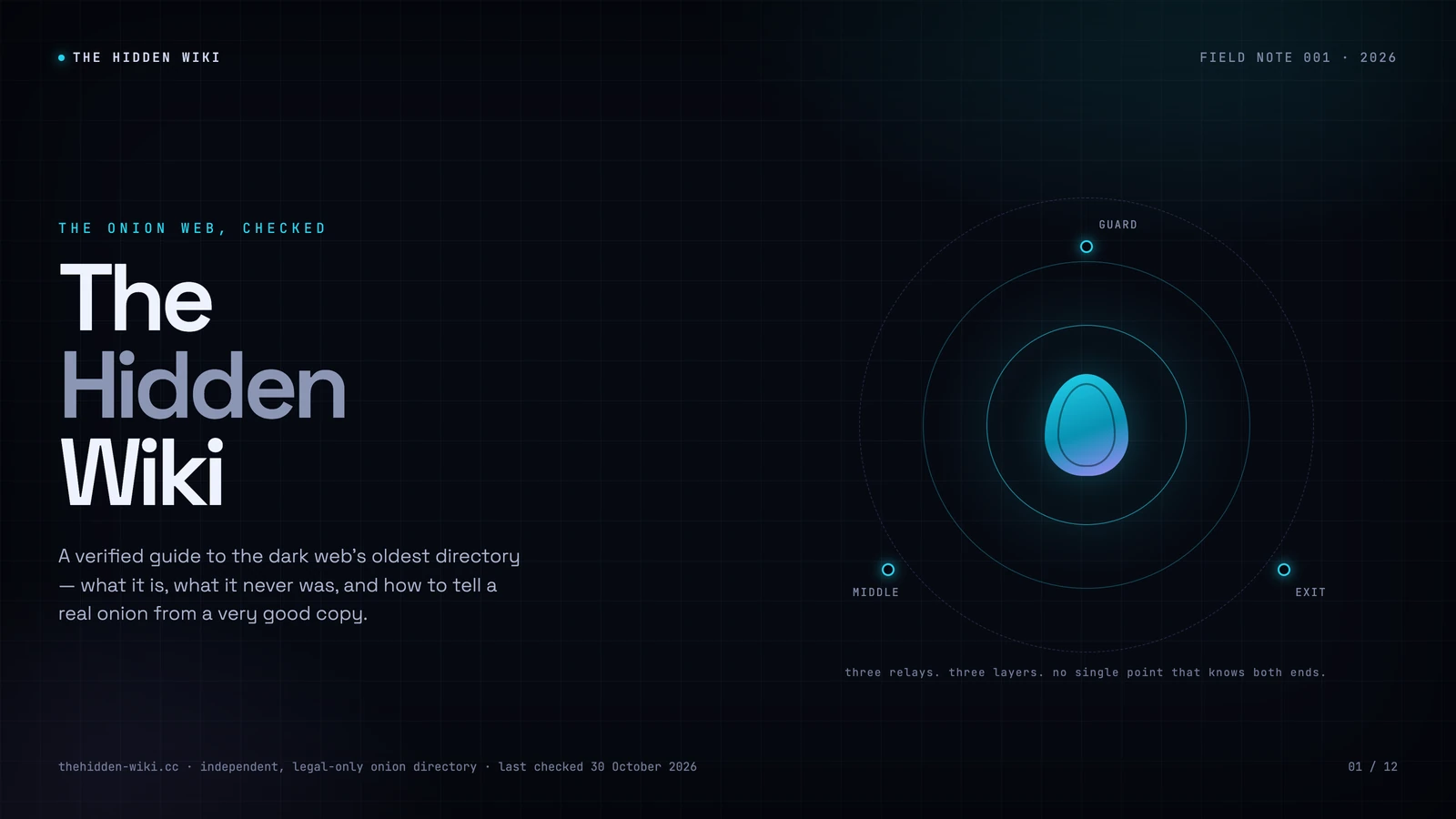
Put simply, the Hidden Wiki is a directory of .onion addresses — the links that open sites on the Tor network — and the name has been reused by dozens of sites since the original vanished.
This page is our attempt to be the exception: a Hidden Wiki that says what it is, dates its work, lists only legal services, and shows you how to check every claim yourself. It is not a marketplace index. It is not a scraped link dump. It is a directory of onion services run by newsrooms, search projects, email providers, libraries, whistleblowing platforms and digital-rights groups — the part of the dark web that most people never hear about because it does not make a good headline.
This page has been rebuilt from the ground up for 2026. The links are checked by hand, the history is sourced, and the warnings are there because we have watched people ignore them.
On this page
The Hidden Wiki Dark Web, Explained Without the Mythology
The phrase does two jobs at once. “Hidden Wiki” is a name, and “dark web” is a neighbourhood. Put them together and people mean one of three things: the original editable wiki from the early Tor years, the many mirrors and clones that inherited the name, or a curated directory like this one that uses the name because people search for it.
The first thing to get straight is that a Hidden Wiki is not hidden. This page is on the ordinary web, served over HTTPS, indexed by search engines. What is hidden is the other end of the links: the .onion addresses, which only resolve inside the Tor network. You can read the directory in any browser. You need Tor to follow it.
The second thing is that the name has no owner. There is no foundation, no registrar, and no canonical address that has lasted. That is why a search for “the hidden wiki” returns a dozen sites making the same claim, and why the honest ones tell you there is no official version. If a directory says it is the official Hidden Wiki, that is a marketing sentence, not a fact you can verify.
The short version. A Hidden Wiki is a directory of onion links. The original was an open wiki, which made it useful and ungovernable. The modern versions are either curated directories, mirrors, or phishing pages. This one is curated, legal-only, and dated. That is the whole pitch.
What the Hidden Wiki is
The Hidden Wiki is a directory of .onion addresses — the long strings that open websites on the Tor network. The original was a MediaWiki installation that anyone could edit after registering, and its main page served as a community-maintained list of links. It appeared in the late 2000s, when Tor had just made it possible for anyone to publish a site without revealing where it was hosted.
That origin explains almost everything that followed. A wiki is good at collecting knowledge and bad at curating a list of places to send money or trust with a password. Open editing meant the list grew quickly. It also meant nobody was responsible for what was on it. The original Hidden Wiki became famous for the worst things it linked to, and that reputation attached itself to the name long after the site itself had vanished.
Today the name covers three different things:
- The historical wiki. A 2007-era community project, later a well-known edition at
kpvz7ki2v5agwt35.onion, hosted for a time by Freedom Hosting. It is gone. Its old addresses are dead. - The clones and mirrors. Sites that copied the name, sometimes the design, and often the links. Some were built in good faith after the original went down. Others exist to swap one address for another and harvest what you type.
- Curated directories. Sites like this one that keep the name because it is what people search for, but publish their criteria, verify addresses against the organisation that runs them, and exclude illegal services.
There is no single official Hidden Wiki in 2026, and there has not been one for over a decade. The original disappeared in stages: a hosting takedown in 2013, a hack and redirect in 2014, a law-enforcement seizure banner later that year. What survived was the name and a habit of copying lists. If you are looking for the “real” one, the honest answer is that the question is malformed. You are looking for a directory you can audit, not a relic you can authenticate.
A short, accurate history
The history of the Hidden Wiki is mostly a history of its hosting. The site was never a monolith; it was a file on somebody else’s server, edited by strangers, and when the server went away the site went with it.
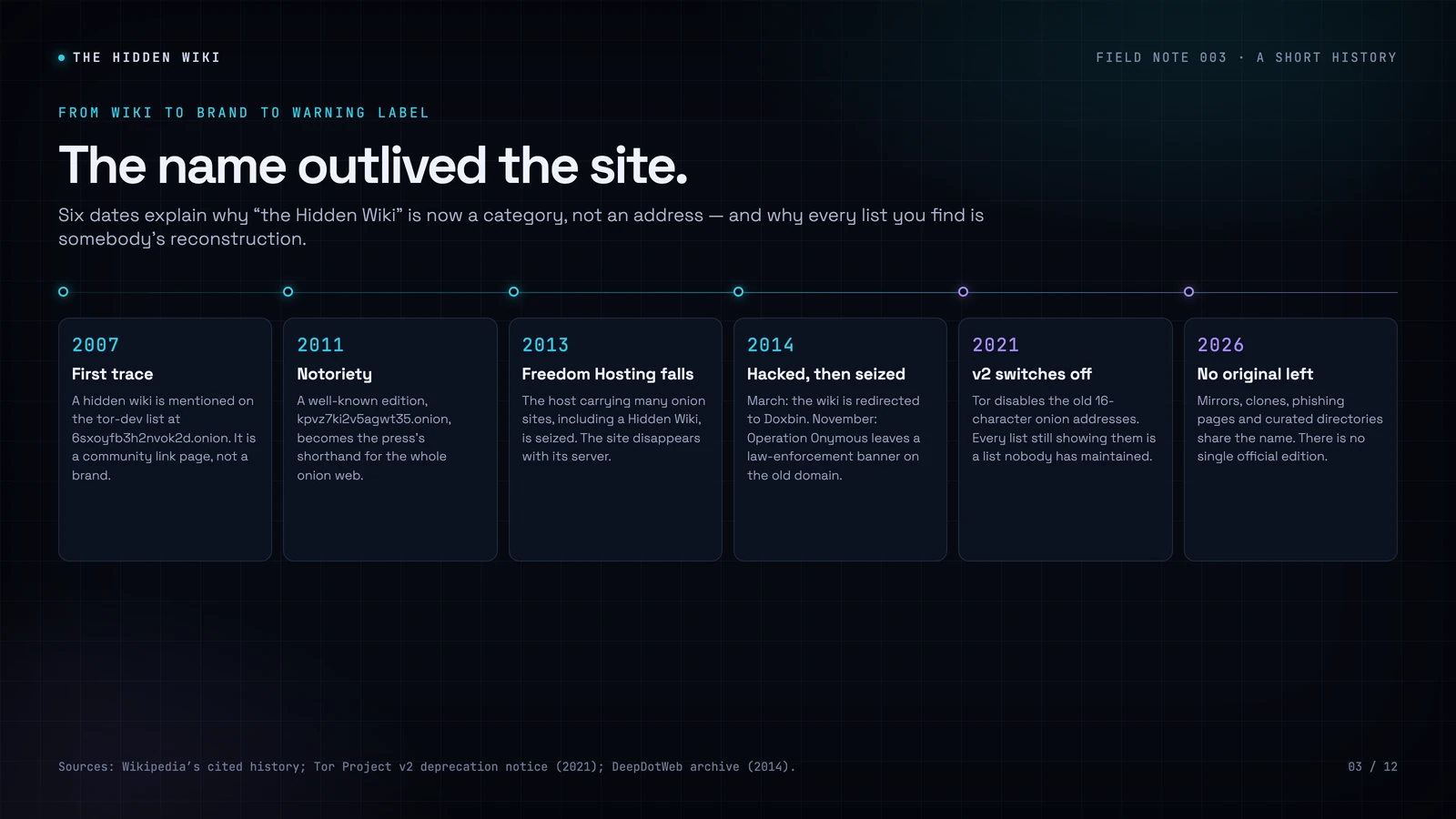
2007. The earliest surviving reference is a June 2007 post on the tor-dev mailing list, which uses the address 6sxoyfb3h2nvok2d.onion. At that point the onion web was tiny, slow, and mostly inhabited by technologists. A shared wiki was a practical way to keep track of what existed.
2011. A well-known edition at kpvz7ki2v5agwt35.onion became the version journalists cited when they wrote about the dark web. That is the point at which the name stopped being a wiki and became a shorthand for the whole onion web — a role it was never designed for.
2013. The site was hosted by Freedom Hosting, a shared provider for onion services. When the US authorities moved against the company in August 2013, a large number of onion sites went offline at once, including a Hidden Wiki. The lesson was structural: a directory is only as durable as the server under it.
2014. In March, the site was hacked and redirected to Doxbin. In November, during Operation Onymous, its old domain served a law-enforcement seizure banner. By then the copies had already started. When the original went down, dozens of sites claimed the name.
2021. Tor retired version 2 onion services. The old 16-character addresses stopped working when Tor removed v2 from the codebase in July 2021 and Tor Browser stopped accepting them in November 2021. Every list that still prints them is a list nobody has maintained since. This is one of the most reliable ways to date a directory at a glance.
2026. There is no original left. There are mirrors, clones, phishing pages, auto-generated link farms, and a small number of curated directories. The name is now a category. The useful question is not “which one is real?” but “which one shows its work?”
How onion links actually work
A modern onion address is 56 characters long, followed by .onion. It uses only the letters a–z and the digits 2–7. If you see a 0, 1, 8 or 9, the address is mistyped or fake. Those digits are not part of the base32 alphabet Tor uses.
The address is derived from the service’s public key. It encodes a 32-byte public key, a checksum, and a version byte. That design has two consequences. First, nobody can hijack a real onion address: there is no registrar, no DNS record, and no certificate authority in the middle. If you type the exact address, you reach whoever holds the corresponding private key. Second, nobody can stop someone from registering a lookalike. The address is self-authenticating, but only if you compare all of it.
When you open an onion site, your Tor client builds a circuit to a rendezvous point. The service builds its own circuit to the same point, after publishing a descriptor through introduction points. Neither side learns the other’s network address. That is different from browsing a normal website through Tor, where the traffic leaves the network at an exit relay and the website sees the exit, not you.
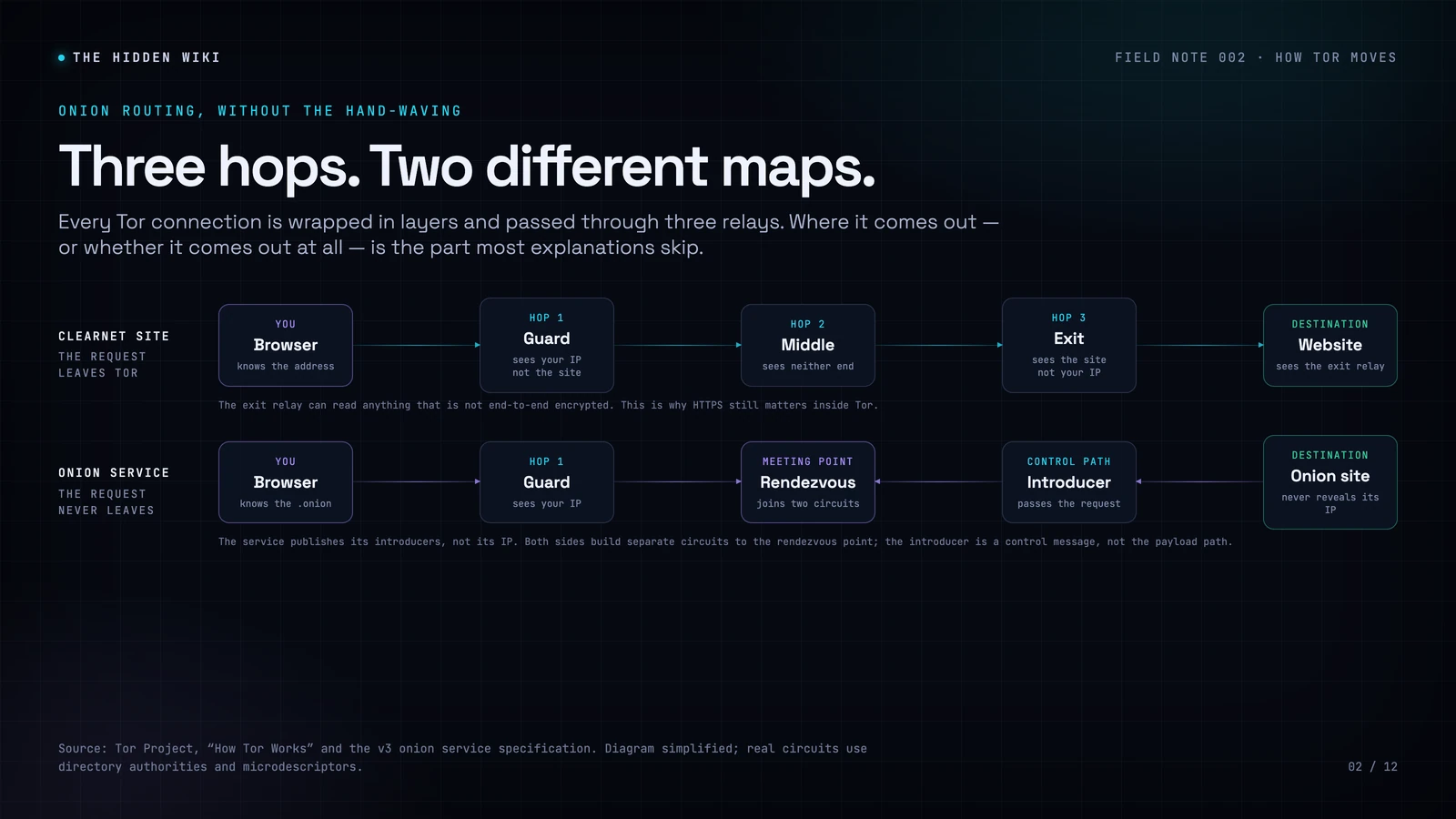
This is why HTTPS still matters inside Tor. An exit relay can see the destination and, if the connection is plain HTTP, the content. Onion services do not use exit relays, but they can still be impersonated at the application layer. The padlock is not a personality trait; it is a statement about which key is on the other end.
There is also a convenience feature worth knowing: Onion-Location. Some organisations advertise their onion address in an HTTP header, and Tor Browser shows a purple .onion available button in the address bar. It is one of the safest ways to find the right address, because it comes from the site you are already visiting rather than from a list.
How to access the Hidden Wiki safely
You do not need to be a systems administrator to use Tor. You do need to install the right software, from the right place, and resist the urge to click the first mirror you see.
- Get Tor Browser from the Tor Project. The only official download is torproject.org/download. Tor Browser 16.0 was released on 29 October 2026. It is based on Firefox ESR 153, ships Tor 0.4.9.15, adds native Linux ARM64 builds, and drops 32-bit Linux. There is no “updated Tor client” sold by a directory, and no plugin you need to install to read a list.
- Update it when it asks. Tor Browser fixes security bugs on a regular cadence. The 15.0.26 release on 21 October 2026 fixed a certificate issue that mattered to anyone using HTTPS through an exit relay. Running an old build is the most common self-inflicted wound in this whole guide.
- Use a bridge if Tor is blocked. Bridges are unlisted entry points. Tor Browser can request one automatically, or you can get one from bridges.torproject.org. obfs4 makes traffic look random, Snowflake routes it through volunteer browsers, WebTunnel disguises it as ordinary HTTPS, and meek uses a CDN front. If one does not work, try another; censorship is local and so is the fix.
- Pick a security level you can live with. Standard enables everything. Safer disables JavaScript on non-HTTPS sites, blocks some fonts and media, and makes audio and video click-to-play. Safest disables JavaScript everywhere and breaks a lot of sites. For reading a directory, Safest is fine. For a site that needs JavaScript, understand that you are trading attack surface for convenience.
- Use the address from the organisation, not from a list. If a newsroom, email provider or search engine publishes an onion address on its own site, use that. A directory is a convenience, not an authority. Cross-check the full 56 characters.
- Bookmark what you verify. The next time you need it, you will not be searching. That single habit prevents most phishing.
- Do not log into your real accounts. Tor hides your IP, not your identity. If you sign into an account that knows your name, the anonymity is gone. Use a separate identity, or don’t log in at all.
For high-risk work, use Tails. Tails is a free operating system that runs from a USB stick, routes everything through Tor, and forgets the session when you shut down. It is the standard recommendation for journalists, researchers and sources handling sensitive material. It is not necessary for reading a public directory. It is necessary when a mistake could cost someone their safety.
How we check every link
A directory is a promise about maintenance. Anyone can copy a list. The work is in the checking, and the proof is in the dates.
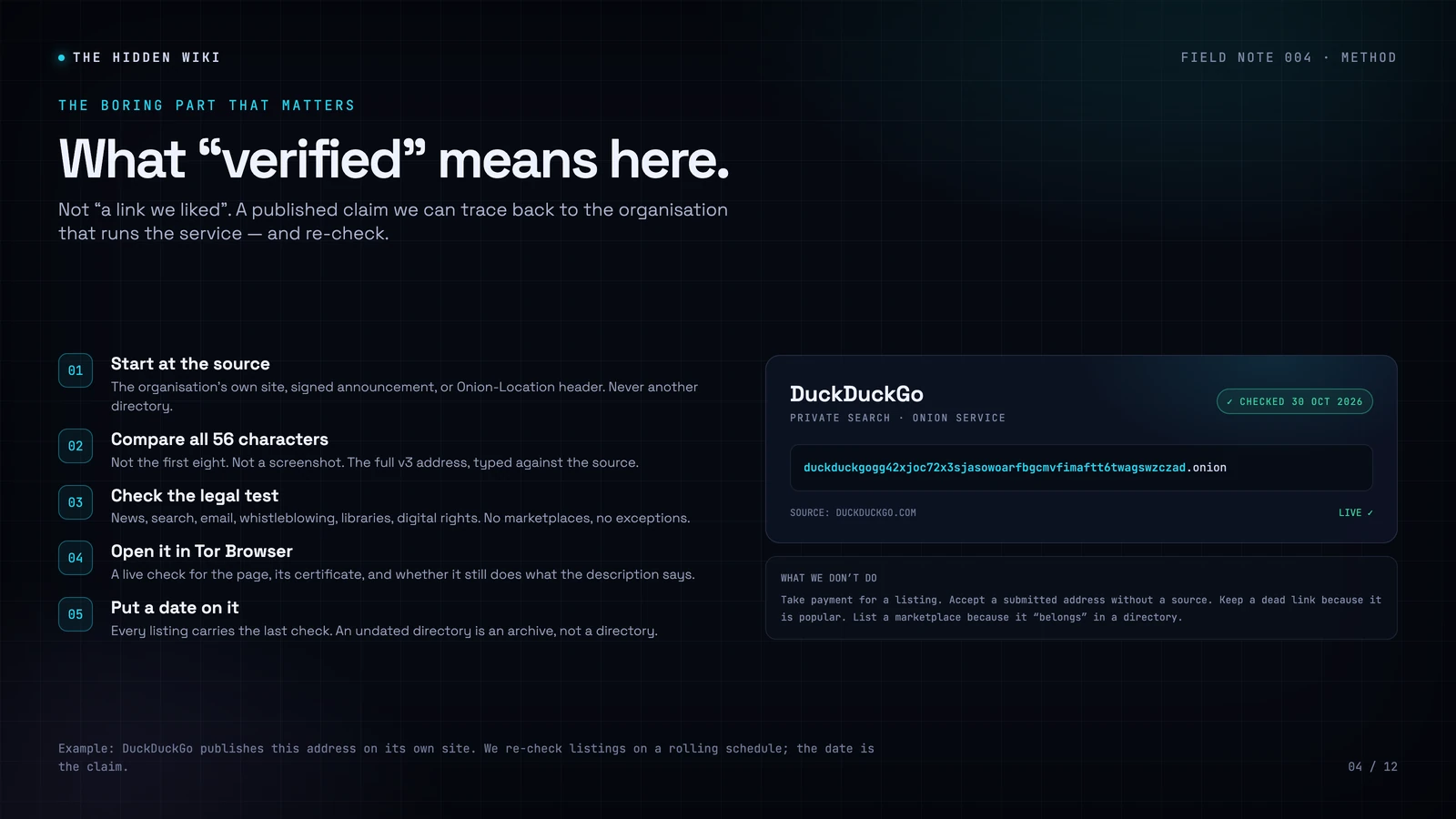
Before a link goes on this page, we do five things:
- Find the address at the source. The organisation’s own website, a signed announcement, its Onion-Location header, or a published key list. Not another directory. Not a screenshot. Not a forum post.
- Compare the full address. All 56 characters, not the first eight. Vanity generators can make the beginning match; they cannot make the checksum match.
- Apply the legal test. News, search, email, messaging, whistleblowing, libraries, education, privacy tools and digital rights. No marketplaces, no gambling, no hacking services, no extremist material, no content involving the exploitation of people. There are no exceptions, and no payment changes the answer.
- Open it in Tor Browser. A link that does not load is not a listing. We check the page, its certificate, and whether it still does what the description says.
- Put a date on it. Every listing carries the last check. An undated directory is an archive, not a directory.
We remove dead links instead of leaving tombstones. We do not accept payment for placement. We do not list a service because it is popular if we cannot verify it. If you find a mistake, tell us; corrections are the only quality control that scales.
What is in the directory
The legal onion web is smaller and stranger than the version in the headlines. It is also more useful. These are the categories we maintain:
Private search engines
Tools that index the web without building a profile of you, including onion-only search engines that filter abuse material.
Journalism and mirrors
Official onion editions of news organisations, used by readers in countries where the clearnet version is blocked.
Encrypted communication
Mail and messaging providers that publish onion addresses, with notes on what each one does and does not protect.
Secure drop points
Submission systems run by newsrooms and civil-society groups for sources who cannot use ordinary channels.
Archives and reference
Collections, mirrors and research materials that are useful to students, journalists and anyone checking a claim.
Digital-rights groups
Organisations that defend privacy, free expression and access to information, and publish onion addresses for censored users.
Six widely used examples are below. They are here to show what a legitimate onion service looks like, not to replace the organisation’s own instructions. Addresses change; the clearnet link on each card is where you should confirm the current one.
DuckDuckGo
Private search engine with an official onion service.
duckduckgogg42xjoc72x3sjasowoarfbgcmvfimaftt6twagswzczad.onionVerify at duckduckgo.com →
Ahmia
Onion search engine that filters abuse material.
juhanurmihxlp77nkq76byazcldy2hlmovfu2epvl5ankdibsot4csyd.onionVerify at ahmia.fi →
BBC News
Official mirror for readers under censorship.
bbcnewsd73hkzno2ini43t4gblxvycyac5aw4gnv7t2rccijh7745uqd.onionVerify at bbc.co.uk/news →
The New York Times
Full news site over Tor.
nytimesn7cgmftshazwhfgzm37qxb44r64ytbb2dj3x62d2lljsciiyd.onionVerify at nytimes.com →
Proton Mail
End-to-end encrypted email.
protonmailrmez3lotccipshtkleegetolb73fuirgj7r4o4vfu7ozyd.onionVerify at proton.me →
Riseup
Email and tools for activists.
vww6ybal4bd7szmgncyruucpgfkqahzddi37ktceo3ah7ngmcopnpyyd.onionVerify at riseup.net →
Addresses checked against each organisation’s published guidance on 30 October 2026. If one fails, go to the clearnet site and look for its onion link rather than trusting a mirror.
How to spot a fake Hidden Wiki
The Hidden Wiki name is unusually easy to impersonate, and plenty of people have tried. The attack is not complicated. A clone copies the layout, keeps most of the links, and changes one address to a site that looks identical to the real thing. You type a password, a recovery phrase or a card number, and it goes to the person who built the clone.
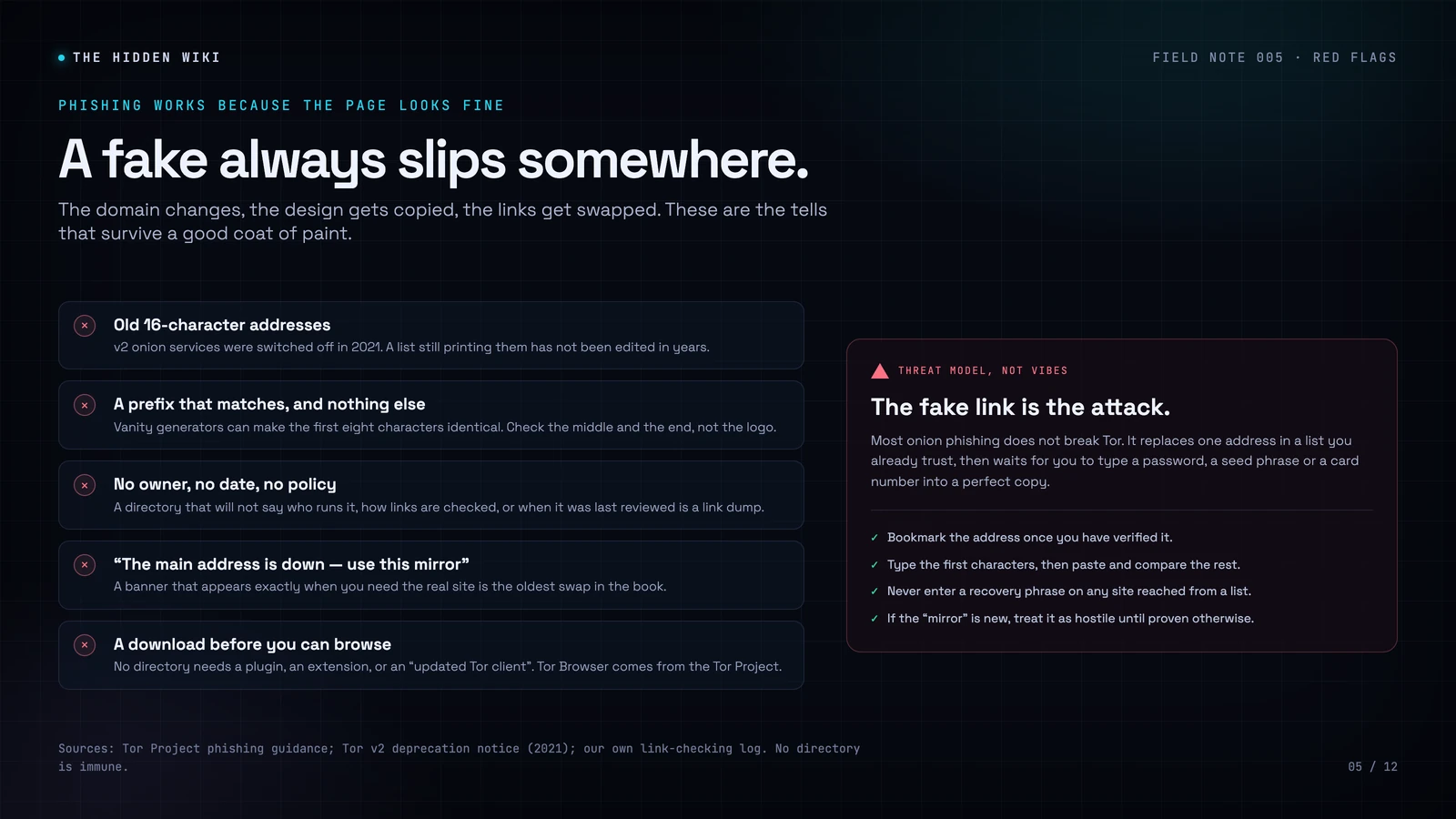
These are the tells we see most often:
- 16-character addresses. Version 2 onion services were switched off in 2021. A list that still prints them has not been edited in years, and its other links deserve the same suspicion.
- Prefix-only matches. A fake can share the first eight characters with the real address. Check the middle and the end. If you are comparing a screenshot, you are not comparing the address.
- No owner, no date, no policy. A directory that will not say who runs it, how it verifies links, or when it was last reviewed is a link dump with a logo.
- “The main address is down — use this mirror.” A banner that appears exactly when you need the real site is the oldest swap in the book. Real outages happen; real directories do not migrate you to a new domain by pop-up.
- A download before you can browse. No directory needs a plugin, an extension, a new Tor client or a “secure browser”. Tor Browser comes from the Tor Project, and nowhere else.
The defence is boring and effective: get the address from the organisation, compare all of it, bookmark it, and never enter a secret on a site you reached from a list. If you want the longer version, our guide to spotting fake and phishing onion links walks through the mechanics.
Is the Hidden Wiki legal?
In most countries, using Tor is legal. The United States, the United Kingdom, Canada, Australia and most of the European Union do not prohibit the browser, the network, or reading a directory. What is illegal is the act you commit with them: fraud, buying illicit goods, accessing abuse material, trafficking, harassment. The tool is not the offence.
A small number of countries block or restrict Tor — China, Iran and Russia are the obvious examples, and the details change often. In those places, using a bridge may be a technical necessity and a legal risk at the same time. If you are unsure about your jurisdiction, check local law before you connect. This page is general information, not legal advice.
The legal test is also why this directory looks the way it does. We list news, search, email, whistleblowing, libraries and rights organisations. We do not list marketplaces. That is not a moral decoration; it is the boundary that keeps a directory from becoming a gateway to the exact content most likely to harm its readers. If you want the longer argument, read our older essay on the Hidden Wiki’s reputation problem — it is dated in places, but the tension it describes is real.
Is it safe?
Tor itself is well tested, open source, and used every day by journalists, researchers, human-rights workers and people living under censorship. The dangers come from what you visit and what you type, not from the fact that the connection is routed through three relays.
The realistic threat model, in order of how often it actually happens:
- Phishing. A convincing copy of a site you already trust, reached through a link you thought was correct. This is the big one. It does not require an exploit, a compromised relay or a government.
- Scams. Services that take payment and deliver nothing, or “support” that asks for remote access to your machine. The onion web has no consumer protection and no chargebacks.
- Malicious downloads. Documents and installers can phone home outside Tor when you open them. A PDF that looks local can still make a network request. Open files in a disposable environment, or not at all.
- Browser exploits. Rare, but real. They are why Tor Browser ships with security levels and why you should not run it with a pile of extensions. Keeping it updated is the single highest-value defence.
- Being observed. Your ISP can see that you use Tor, even if it cannot see what you do inside it. In a country where that matters, use a bridge and read the local law.
None of this requires paranoia. It requires a small number of habits: verify addresses, update the browser, do not log into personal accounts, do not open untrusted files, and use Tails when the stakes are high. The people who get hurt on the onion web are rarely the ones who understand the network. They are the ones who trusted a directory that looked fine.
What changed in 2026
The last month has been busier than usual for Tor users, and not because of a new anonymity feature.
Tor Browser 16.0 arrived on 29 October 2026. It moves to Firefox ESR 153, ships Tor 0.4.9.15, redesigns the Settings experience, adds an option for generic window titles, and adds native Linux ARM64 builds. It also drops 32-bit Linux, which affects a small number of old machines. The full changelog is on the Tor Project blog.
Tails 7.15.1 shipped on 23 October 2026 as an emergency release. It removes the eMudhra certificate authority after intermediate certificates were compromised. The interesting part for anyone who uses Tor is the explanation: with a compromised intermediate, an attacker could impersonate any HTTPS website, and that attacker could be a Tor exit node, the ISP of an exit node, or a government. Onion sites were not vulnerable. The advisory is worth reading in full on the Tails release notes.
The old v2 addresses are still dead. They have been since 2021. If a directory is still printing 16-character addresses, it is not a directory; it is a screensaver.
The network is smaller than the hype and larger than the panic. Tor Metrics counted 9,147 running relays on 26 October 2026, of which 7,605 were stable. Those relays carry traffic for millions of daily users, most of whom are not doing anything interesting. That is the point.
Questions people actually ask
What is the Hidden Wiki?
The Hidden Wiki is a directory of .onion addresses, the links that open websites on the Tor network. The original was an editable wiki from the early Tor era. Today the name is used by mirrors, clones, phishing sites and curated directories. There is no single official version.
Is the Hidden Wiki still working in 2026?
Sites using the name are still online, but the original is gone and many copies are stale or hostile. This page is maintained, legal-only, and was last reviewed on 30 October 2026. If a directory cannot tell you when it was last checked, assume it has not been.
What is the official Hidden Wiki link?
There is no official link. The original disappeared in stages between 2013 and 2014, and the name was never owned by anyone. Treat any claim of official status as a red flag, and judge a directory by whether it publishes its sources, criteria and review dates.
Do I need Tor to use the Hidden Wiki?
You can read this page in any browser. You need Tor Browser, or another Tor-enabled app, to open the .onion links. Do not use a clearnet “onion gateway”: the gateway sits in the middle and can see or alter everything you do.
Can I access it from a phone?
Yes. On Android, use the official Tor Browser for Android. On iPhone and iPad, the Tor Project recommends Onion Browser. Install from the official app store listing or the developer’s own site, not from a mirror.
Should I use a VPN with Tor?
Most people do not need to. Tor already hides your IP from the sites you visit. A VPN can hide the fact that you use Tor from your ISP, but bridges do that too and are usually the better tool. If you do combine them, understand that the VPN sees your traffic and becomes another party you have to trust.
Is the Hidden Wiki legal?
Using Tor and reading a directory are legal in most countries, including the US, UK, Canada, Australia and most of the EU. The illegal act is the crime, not the browser. A few countries block or restrict Tor; check local law if you are unsure. This is not legal advice.
Why don’t you list marketplaces?
Because most of them sell illegal goods, many are scams, and listing them would turn a directory into a gateway to harm. Our purpose is to help people find legal, useful services and avoid phishing. Marketplaces do neither.
How often is the page updated?
We review links on a rolling schedule and update the page when a service changes its address, closes, or when Tor ships a security-relevant release. The date at the top is the last full review, not the last time we fixed a typo.
How do I suggest a link?
Send the address and the official page where the organisation publishes it through our contact form. We check every suggestion against the same criteria. We do not accept payment for listings.
What is the difference between the deep web and the dark web?
The deep web is anything search engines do not index: your inbox, your bank, private company systems. It is most of the internet and completely ordinary. The dark web is the much smaller set of sites that need special software such as Tor. Onion services are part of the dark web, and a lot of them are legal.
Where to go next
The Hidden Wiki began as a shared map for a network that was hard to navigate. The map has been redrawn, copied, forged and lost several times since. What survives is the useful part: a way to find the newsrooms, search engines, mail providers and rights groups that made the onion web worth visiting in the first place.
Take your time. Verify every address. Keep Tor Browser updated. Bookmark what you trust. And when a directory cannot tell you who runs it or when it was last checked, close the tab.
Encrypted messengers compared
Metadata: the leak most people ignore
Host your own onion site
Sources and further reading: Wikipedia’s cited history of The Hidden Wiki; the Tor Project’s v2 deprecation timeline; Tor Support; Tor Metrics; Tor Browser 16.0 release notes; Tails 7.15.1 release notes.