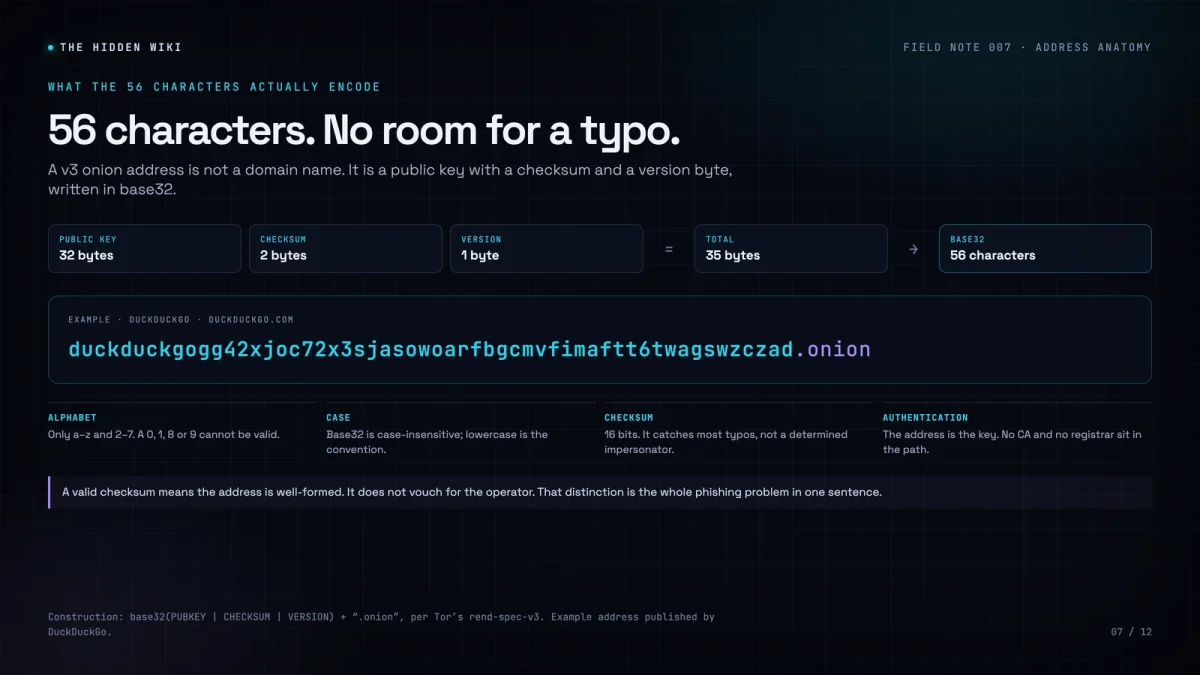
A modern onion address looks like a mistake. It is 56 characters of lowercase letters and digits, followed by .onion, and it contains no spaces, no hyphens, and no obvious relationship to the site it opens. People copy it wrong, truncate it in chat, screenshot it, and then blame Tor when the page does not load.
It helps to know what the string actually is. A v3 onion address is not a domain name in the ordinary sense. It is a public key, a checksum, and a version byte, encoded in base32. Once you see the structure, the rules stop looking arbitrary.
The construction, in one line
The address is base32(PUBKEY | CHECKSUM | VERSION), followed by .onion. The public key is 32 bytes. The checksum is 2 bytes. The version is 1 byte. That is 35 bytes, which is 280 bits, which encodes to exactly 56 base32 characters.
Base32 uses 32 symbols: the letters a–z and the digits 2–7. That is why a valid onion address can never contain a 0, 1, 8 or 9. It is not that Tor filters those characters out. They are not part of the alphabet. If you see one, the address is mistyped, or it was never an onion address at all.
Case is a common point of confusion. Base32 is case-insensitive, and DNS names are case-insensitive too, so DUCKDUCK... and duckduck... refer to the same service. Tor Browser displays addresses in lowercase by convention. Do not treat uppercase as a sign of a fake, and do not assume that changing the case changes the destination.
What the checksum does, and does not do
The two-byte checksum is a typo detector. It is computed from the public key and the version byte, and Tor checks it before trying to connect. If you change one character, the checksum will almost always fail, and Tor Browser will tell you the address is invalid rather than sending you somewhere unexpected.
“Almost always” is doing real work in that sentence. The checksum is 16 bits, so a corrupted address has roughly a one-in-65,536 chance of producing a valid checksum by accident. That is good enough to catch typing errors. It is not a security mechanism. Anyone can generate a new key pair and a valid address in seconds. The checksum tells you that the string is well-formed. It does not tell you who is behind it.
This is the difference between authentication and identification. The address authenticates the service’s key: if you reach the address you intended, the site you reach is the one that holds the corresponding private key. It does not tell you whether the operator is honest, whether the service is legal, or whether the content is what you expected. Those are separate questions, and no amount of cryptographic structure answers them.
Why the address cannot be hijacked, but can be impersonated
There is no central registry for onion addresses. The name is derived from the key, so there is no account to take over and no DNS record to poison. If you type the exact address, you reach the key holder. That is a stronger property than most of the web enjoys.
It also makes impersonation cheap. An attacker does not need to steal the address. They need you to type a different one. A lookalike can share the first eight characters, the last four, or the general shape of the string. Vanity address generators make the prefix match easy: you brute-force keys until the base32 output starts with the letters you want. The result looks official and is worthless as a trust signal.
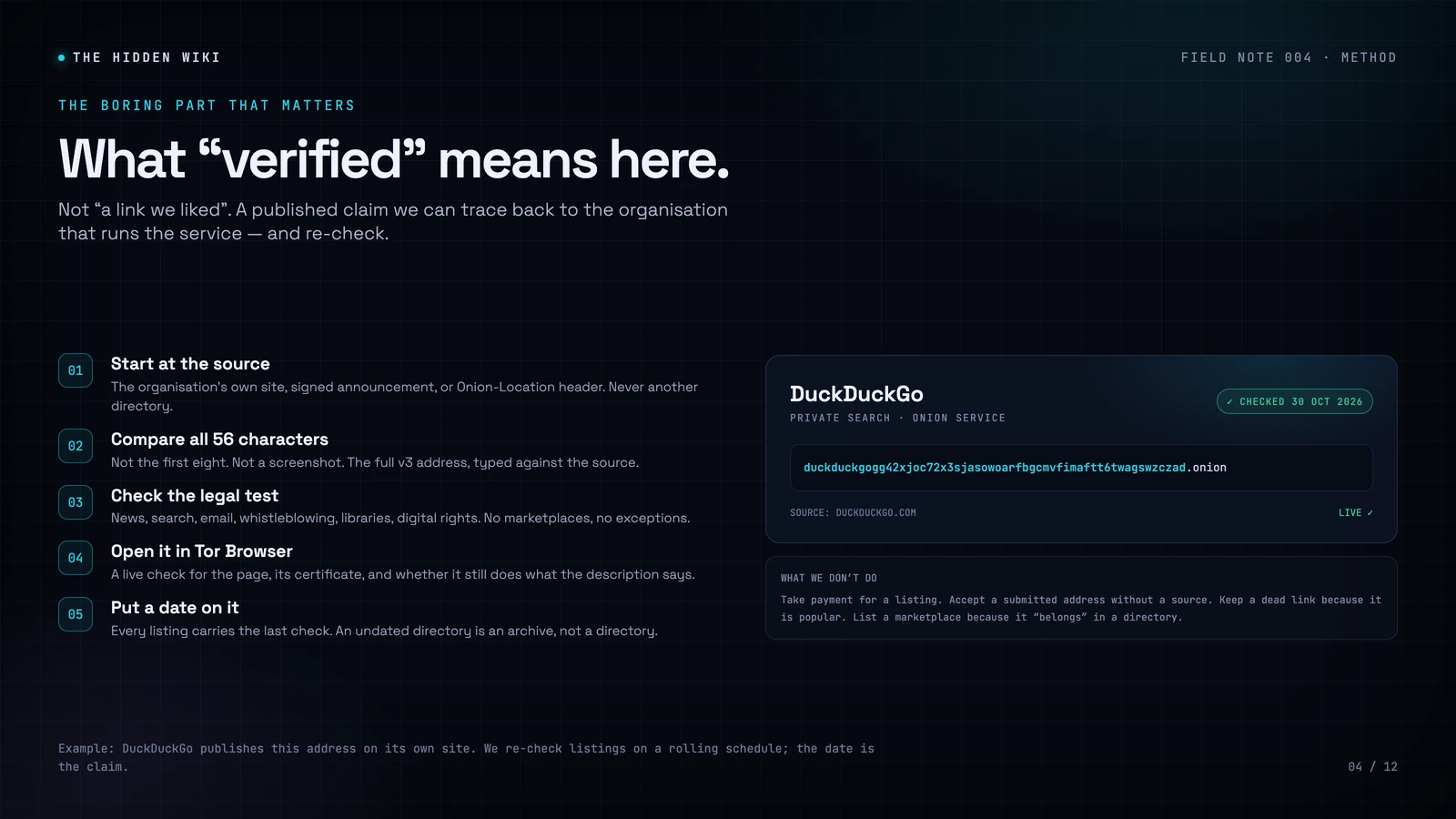
The only defence is to compare the whole address against a source you trust. Not the first eight characters. Not a screenshot. Not the logo next to it. The whole string, ideally from the organisation’s own site or its Onion-Location header.
A valid checksum means the address is well-formed. It does not mean the site is honest. Those are different claims, and conflating them is how phishing works.
A practical comparison method
Reading 56 characters is hard for the same reason remembering a random password is hard. The string has no rhythm and no meaning. A few habits make it manageable:
- Group it. Split the address into chunks of four characters. Most password managers and text editors will not do this for you, so do it mentally or paste it into a notes app with spaces, then remove the spaces before use.
- Read from the end. Phishing addresses often match at the beginning and diverge later. Compare the last 12 characters first, then the middle, then the beginning.
- Use the source, not the list. If a newsroom or email provider publishes an onion address on its own site, copy it from there. A directory is a convenience, not an authority.
- Bookmark the result. Once you have verified an address, save it. The next time you need it, you will not be searching, and you will not be one click away from a clone.
- Do not trust screenshots. Screenshots get cropped, compressed, and OCR’d. A single character can change in transit. Copy text, not pixels.
There is one more subtlety: visual ambiguity. The base32 alphabet includes pairs that look similar in some fonts, such as i and l, or 2 and z. A determined impersonator can exploit that. If you are reading an address aloud or retyping it from a screen, slow down at those characters. It is tedious. It is also the entire attack surface.
Onion-Location, and why it helps
Some organisations advertise their onion address in an HTTP header. When you visit their clearnet site in Tor Browser, a purple .onion available button appears in the address bar. Clicking it reloads the site at its onion address. The header is served over HTTPS, so a malicious exit relay cannot silently swap it, and the button is never shown on an onion site.
This is one of the safest ways to find a legitimate address because it comes from the site you are already visiting, not from a third-party list. It is not perfect. The site has to support it, the header has to be configured correctly, and the button is a suggestion rather than an automatic redirect. But it removes the most common failure mode: a human typing 56 characters from a directory.
What the address does not tell you
An onion address is a cryptographic identifier, not a reputation. It does not tell you whether the service is legal, whether it will still exist next week, whether the operator is competent, or whether the content is what the directory claims. Those are editorial questions, and they require a different kind of checking.
That is why a directory needs a method, not just a list. The address can be verified mechanically. The claim around it — “this is the BBC’s onion mirror” — has to be verified against the BBC. The two checks are separate, and a directory that only does the first is not doing the job.